HomeNewsSales targets and actuals side by side
Track every salesperson’s target and actual side by side with Leads

Why the target sheet stays in a drawer
Targets are set at the start of the year, written into a file and often never opened again. A salesperson learns how close they are only by asking; the manager sees it in the month-end report.
When the target is not visible, neither is the direction. The team works hard but cannot tell whether it is working on the right things.
How sales targets work in Leads
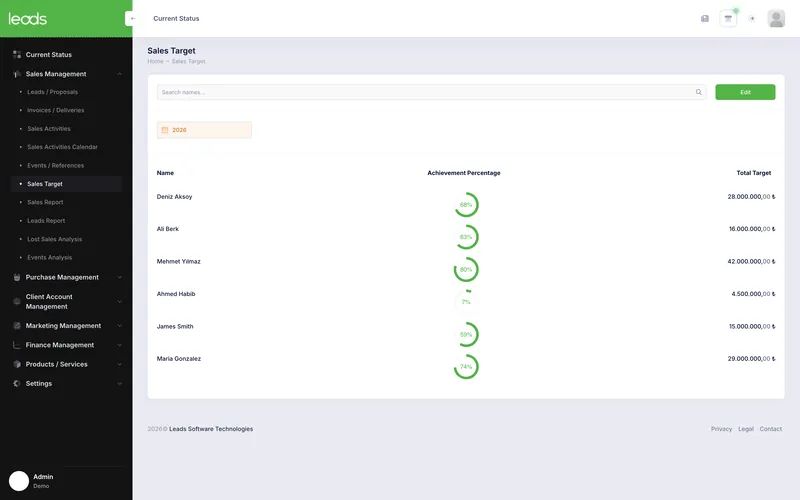
On the Sales Target screen you enter a target for each team member per period. Leads matches won sales against these targets and shows each person’s actual amount together with the ratio to target.
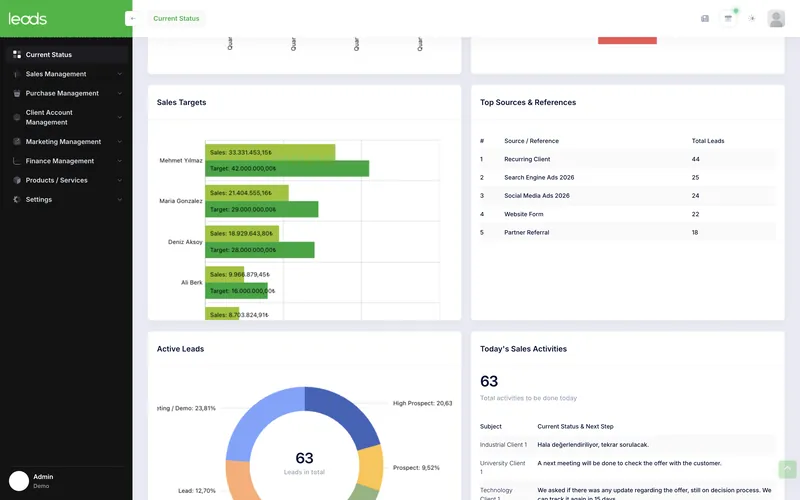
The same comparison appears on the dashboard: each salesperson’s sales and target sit side by side in one bar. There is no separate report to prepare.
What it brings to your business
- Everyone knows where they stand: the salesperson sees the remaining amount themselves.
- Support goes to the right person: you notice a team member falling behind before the month ends.
- Targets become realistic: last period’s actual is the best source for next period’s target.
- Fewer arguments about bonuses and reviews: the number sits where everyone can see it.
A visible target brings clarity, not pressure.