HomeNewsInvoice and delivery tracking
Invoice and delivery tracking arrives in Leads: finish what you win

What gets forgotten after the sale closes
The sales team wins the deal and turns to the next opportunity. Issuing the invoice and delivering the product or service is someone else’s job; the information usually travels in a message, and sometimes not at all.
The result: invoices waiting for days, orders assumed to be delivered, and late collections. A won sale is not complete until the money is in.
How invoice and delivery tracking works in Leads
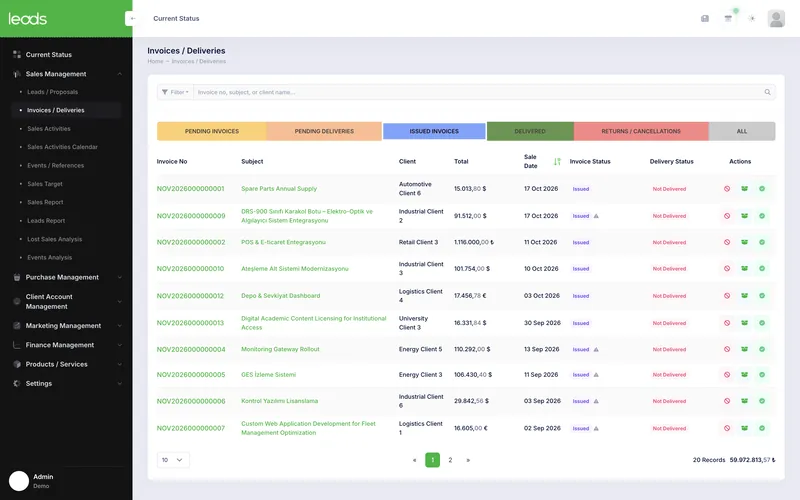
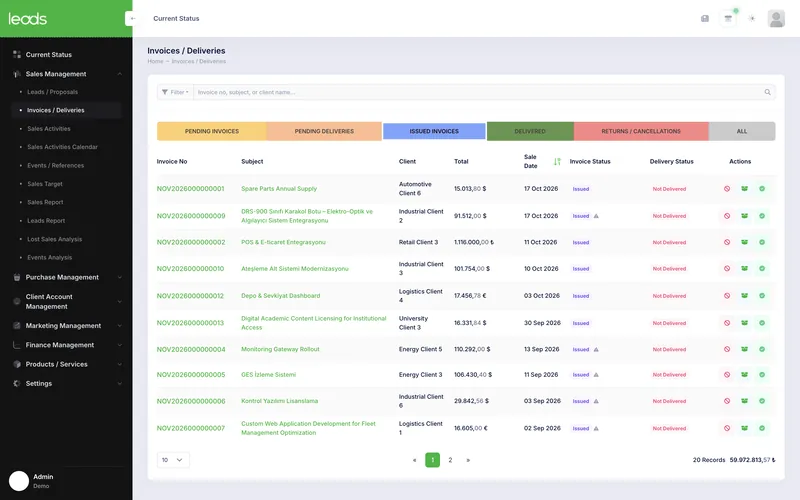
When a lead is won it lands on the Invoices / Deliveries screen. Tabs separate the status by themselves: Pending Invoices, Pending Deliveries, Issued Invoices, Delivered and Returns / Cancellations.
Each row carries the subject, client, amount, sale date, and invoice and delivery status. When you mark an invoice as issued or a delivery as completed, the record moves to the matching tab.
What it brings to your business
- No job stays uninvoiced: pending invoices gather in one tab.
- Collection speeds up: the invoice goes out early and the payment term starts early.
- Sales and operations look at the same list: the question of who is waiting for what disappears.
- You give the customer a clear answer: the invoice and delivery status of the order is in the record.