HomeNewsCurrent tasks and tasks calendar
See who holds which job and how many days are left, in one list with Leads

Why workload ends up unbalanced
One person tries to keep up with everything while another waits for a new task. The manager usually notices when a deadline is missed.
The problem is not bad intent, it is invisibility. When who holds what is not in one place, sharing work fairly and seeing delays in advance is impossible.
How current tasks are followed in Leads
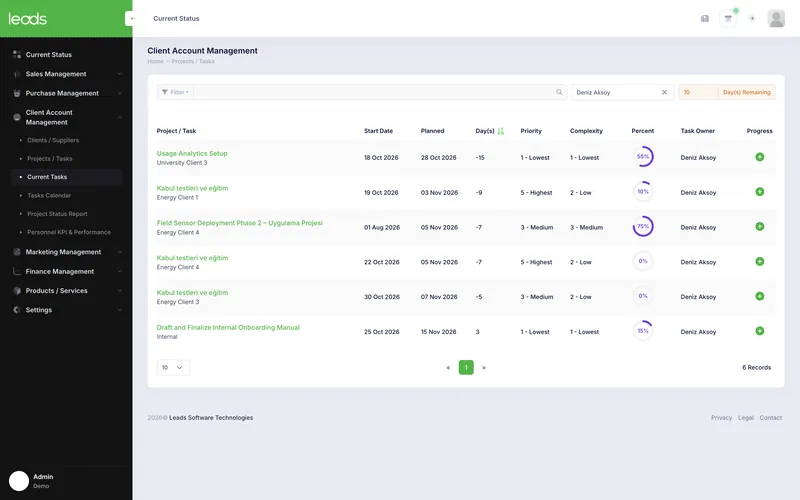
The Current Tasks screen sorts work in progress by days remaining. Each row carries the start and planned end date, the number of days left or overdue, priority, complexity, completion percentage and the task owner.
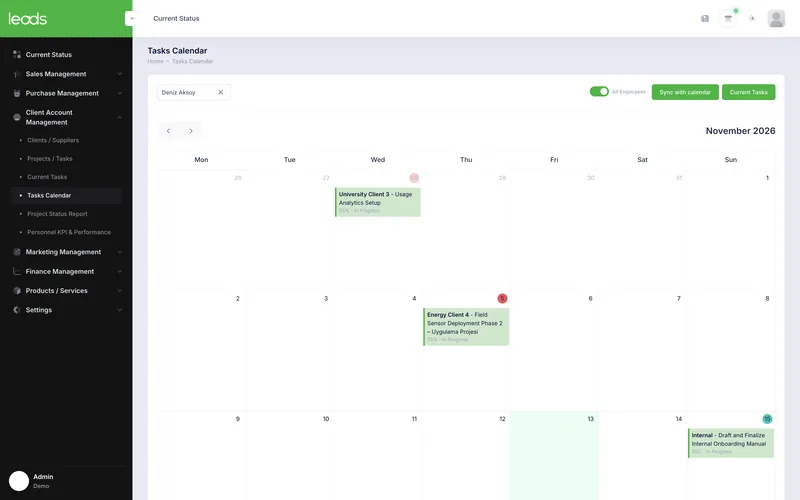
The Tasks Calendar shows the same work in a month view. You can look at your own tasks or those of all employees, and sync the calendar with the calendar app you use.
What it brings to your business
- Delays are seen in advance: work about to run out of time is at the top of the list.
- Work is shared fairly: how many tasks each person holds is in the open.
- No debate about priority: high-priority work stands out by its label.
- Meetings get shorter: you look at the list instead of asking for status.